

Empowering Your Community to Create Content Without the Admin Dashboard
In the modern WordPress ecosystem, user-generated content is the lifeblood of successful community-driven websites. Whether you’re running a multi-author blog, a news portal, a magazine, or a membership site, allowing your users to submit and manage their own posts directly from the front end can transform your platform. Enter Blogimy – a powerful, feature-rich WordPress plugin developed by Minihosting Technologies that revolutionizes how you handle user submissions.
What is Blogimy?
Blogimy is a comprehensive front-end post submission and management plugin that enables registered users to create, edit, and manage their blog posts without ever accessing the WordPress admin dashboard. With version 1.0.4, Blogimy offers a seamless, intuitive experience that mimics the full power of the WordPress editor while keeping users safely on the front end of your website.
Why Choose Blogimy?
Traditional WordPress setups require authors to log into the admin area to write posts. This approach has several drawbacks: it exposes your admin interface to potentially untrained users, creates a disjointed user experience, and can be intimidating for non-technical contributors. Blogimy solves all these problems by bringing the entire post creation workflow to the front end.
Key Features That Set Blogimy Apart
1. Complete Front-End Post Management
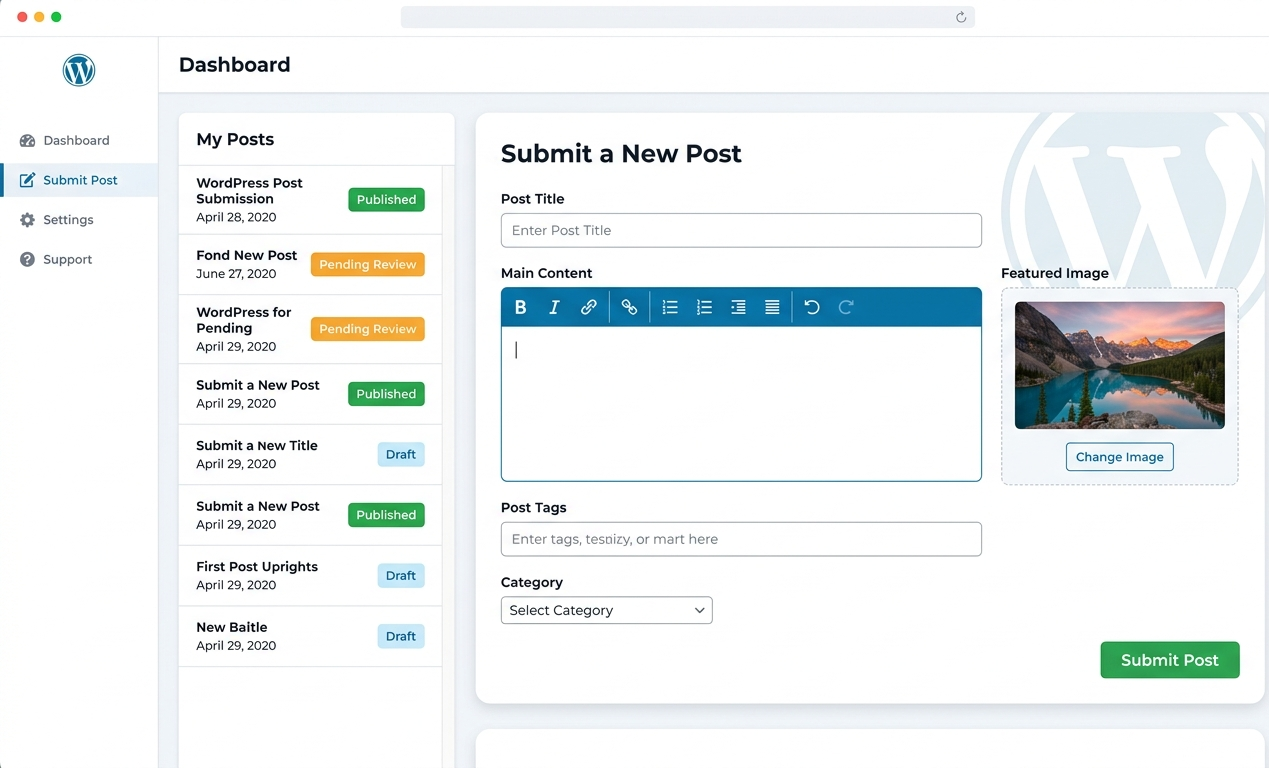
Blogimy allows users to submit new posts and edit their existing content entirely from the front end. The plugin automatically tracks each user’s posts, displaying them in a clean, organized list with status indicators for published, pending, and draft content. Users can click any post to edit it instantly.
2. Full WYSIWYG Editor Experience
Unlike many front-end submission plugins that offer limited formatting options, Blogimy integrates the complete WordPress TinyMCE editor. Users get access to:
- Rich text formatting (bold, italic, underline, strikethrough)
- Multiple text alignment options
- Bulleted and numbered lists
- Blockquotes and pre-formatted text
- Link insertion with target controls
- Media upload and embedding
- Custom colors and font styles
The editor toolbar features a clean white background with intuitive dark icons that turn blue on hover, providing a professional, distraction-free writing environment. Full RTL (Right-to-Left) language support ensures compatibility with Arabic, Hebrew, and other RTL languages.
3. Custom Login and Registration System
Blogimy includes a complete authentication system with tabbed interfaces for login and registration. This keeps users within your site’s design language and eliminates the need to redirect to the default WordPress login page. The registration form includes:
- Username selection
- Email address verification
- Password creation with confirmation
- Real-time validation
Upon successful registration, users are automatically assigned the Author role and can immediately begin submitting content.
4. Advanced Post Parameters
Blogimy supports all essential post parameters:
- Featured Images: Users can upload, set, and remove featured images using the WordPress media library, with live preview functionality.
- Post Scheduling: Writers can schedule posts for future publication by setting a custom date and time.
- Status Management: Posts can be published immediately, saved as drafts, or submitted for review (pending status).
- Categories and Tags: Users can organize their content with taxonomy support, including category dropdown selection and comma-separated tags.
- Excerpts: Custom post summaries can be added for archive pages and SEO benefits.
5. Automatic Updates with Custom Update Server
Blogimy features a built-in auto-update system that checks for new versions from Minihosting’s secure update server. The plugin:
- Displays a “Check for updates” link in the WordPress plugins page meta row
- Shows version information with “By: Minihosting Technologies” attribution
- Provides one-click update functionality through the WordPress update system
- Supports enabling/disabling automatic updates directly from the plugins page
6. Polylang Multilingual Compatibility
For international websites, Blogimy fully integrates with the Polylang plugin. When a user creates a post, Blogimy automatically assigns the current language to the post, making it easy to build multilingual content ecosystems.
7. Role-Based Access Control
Site administrators can control exactly which user roles can submit posts through the plugin settings. By default, Authors, Editors, and Administrators have access, but this can be customized to include Contributors, Subscribers, or custom roles.
Installation and Setup
Getting started with Blogimy is straightforward:
-
Upload the plugin folder to
/wp-content/plugins/blogimy/ -
Activate Blogimy from the WordPress Plugins screen
-
Navigate to Settings → Blogimy to configure your pages
-
Select or create the page for post submission (contains
[blogimy_post_form]shortcode) -
Select or create the page for login/registration (contains
[blogimy_login_register]shortcode) -
Choose which user roles can submit posts
-
Add the shortcodes to your selected pages
The plugin automatically creates default pages upon activation, but you can reassign them at any time through the settings panel.
The User Experience
For Logged-In Users
When a registered user visits the login/registration page, Blogimy displays a personalized dashboard showing:
- A welcome message with the user’s display name
- “Submit New Post” and “Logout” buttons
- A complete list of the user’s posts with direct edit links
- Status indicators for pending and draft posts
For New Visitors
First-time visitors see the tabbed interface with login and registration forms. The clean, centered design guides users through the authentication process without confusion.
The Post Submission Form
The submission form is comprehensive yet intuitive:
- Post Title field (required)
- Full WYSIWYG content editor (required)
- Excerpt textarea
- Featured image uploader with preview
- Post date picker (optional)
- Post status selector (Publish, Draft, Pending Review)
- Category dropdown
- Tags input field
- Submit/Update button
Security and Best Practices
Blogimy takes security seriously with multiple layers of protection:
- Nonce Verification: All forms include WordPress nonce fields to prevent CSRF attacks
- Capability Checks: The plugin verifies user permissions before allowing any action
- Data Sanitization: All input data is properly sanitized and validated
- Author Verification: Users can only edit their own posts, not content from other authors
Use Cases
Multi-Author Blogs
Perfect for websites with multiple contributors who shouldn’t have admin access.
News Portals
Enable citizen journalism by allowing readers to submit news tips and full articles.
Educational Platforms
Students can submit assignments and essays through a controlled front-end interface.
Membership Sites
Paid members can create content as part of their subscription benefits.
Corporate Intranets
Employees can share updates and announcements without IT intervention.
Technical Specifications
- Minimum WordPress Version: 5.0
- Minimum PHP Version: 7.2
- Database: MySQL 5.6 or higher
- Compatible Browsers: Chrome, Firefox, Safari, Edge (modern versions)
- Multilingual Support: Polylang integration
- RTL Support: Full RTL compatibility
Support and Documentation
Blogimy is actively maintained by Minihosting Technologies. Users can access:
- Inline help text throughout the settings panel
- Detailed changelog in the plugin modal
- Direct links to the plugin website and support resources
- Automatic updates from the secure update server
Conclusion
Blogimy represents a significant step forward in front-end WordPress content management. By combining a familiar editing experience with robust security and user-friendly design, it empowers site owners to open their platforms to user contributions without compromising safety or usability.
Whether you’re building a community blog, a news platform, or any site that benefits from user-generated content, Blogimy provides the tools you need to succeed. The plugin’s thoughtful feature set by Minihosting Technologies, regular updates, and professional support make it an invaluable addition to any WordPress site that values user participation.


Leave feedback about this